For those who don’t know me that well and only know that I work with computers for a living would probably think that I enjoy giving techy and geeky presents to friends and family. With all the electronics out there I have to say that the gifts I enjoy giving the most are the ones that come out of my kitchen. The most technology that gets used is the oven and the FoodNetwork searches that I do for new recipes (and my Kitchenaid stand mixer which is one of the best things anyone could have invented). It seems like homemade things are getting harder and harder to find. A good example is the marshmallows I made this year. Yes people, I made marshmallows. The usual response I got of “Why on earth would you MAKE marshmallows?!” when I handed them out with my hot cocoa mix. I know I could buy them but they are just so much better when you make them from scratch. Fun too, actually. It’s really cool to see what sugar does when you cook it to different temperatures. Point being, if you’re having a hard time finding that perfect present this year and Best Buy just isn’t doing it for you, try your hand in the kitchen. It doesn’t have to be something as intricate as marshmallows. Even the recipe on the back of the chocolate chip bag would work, especially if you wrap them in some pretty cellophane with some nice ribbon. If you take some time to make something from the heart I think people will appreciate it more than even a really cool gadget (unless it can enable you to time travel…nothing would beat that!).
Have a Merry Christmas!
PS – Despite the reaction, no one turned down eating the marshmallows. :)
Thursday, December 20, 2007
Santa Isn’t The Only One Who Loves Cookies

Tuesday, December 4, 2007
Virtual Dollar Store
It seems even gifts are going the way of the digital revolution in a whole new way. I recently read an article about how popular virtual gifts are becoming. Yep, people are paying money (real money at that, not the virtual kind) to buy things like $1 gifts on Facebook. These gifts include virtual shoes, beer, and accessories…intangible items that you display on your webpage. In less than a year people have bought more than 24 million of these dollar items for their friends and family on Facebook alone (talk about money that could go to charity!). Some gifts on other sites go for $2 or $3. I kind of wonder about these since it seems kind of impersonal to give someone something like this for a big event like a birthday, anniversary, or even Christmas. Webpages come and go, and people go in and out of phases too so there’s no telling if that person will have their webpage in another year or two. I guess coming from someone frugal, spending a dollar or two on a little gif for someone’s Facebook page seems a bit silly when you could spend that same money on something small, or even a cup of coffee at the local coffee shop and spend a few minutes with that person. As virtual gifts become more and more popular, I have the hope that people won’t forget the personal touch when it comes to gift giving.
Tuesday, November 27, 2007
Feed the Hungry with Vocabulary Knowledge
There’s a website that I just found out about called FreeRice.com that will donate 10 grains of rice for every vocabulary word you can answer the meaning of correctly. Snopes has a verification page with more info about the site. The UN’s World Food Programme (WFP) donates the rice. It’s a good thing they don’t penalize you for getting the words wrong or I would have just cost them a lot of grains of rice. :)
Thursday, November 15, 2007
Pzza Ordrs By Txt Msg
Papa John’s has started providing a new way to order your pizza at about 2700 locations. Instead of calling in for delivery, you can now send a text message using your cell phone. Even Domino’s is making sure that those customers with mobile devices on the internet can place the order through their browser. Ok, I admit they would have to come up with some better abbreviations than I did for this kind of thing. Papa John’s has already thought of that. You can enter “FAV1,” “FAV2,” “FAV3,” or “FAV4” in the message depending on what you saved in each of these names. You can also save your payment and address information. It seems that this is just one more step towards less and less human contact in a way. However, this will definitely appeal to the younger crowd and will probably create a big benefit for the consumer and the company.
Wednesday, November 14, 2007
Study Shows That Most Parents Aren’t Into Gaming
One of the latest polls says that parents and gaming isn’t the best relationship out there. It seems the majority of parents never or very rarely join their kids in playing games. I can understand how parents want to limit their child’s time gaming. I mean, there is such a thing as the real world and kids need to get out and run around a bit. However, I think that if they’re going to allow the kids to game they should join right in. I have to think that when my husband and I have kids, we’ll be playing right alongside them (or against them, whichever works). A little gaming, whether it is Halo or Wii Sports, can be a good stress reliever after a long day. It’s nice to go home and just do some fun for a little bit. We usually appreciate the graphics and the beauty that the games offer, as well as the storylines and over all fun factor. A friend of mine recently told me that she played Halo with her 17 year old son and really had a blast. She never really plays the Xbox but she still enjoyed it. So parents, if you’ve never tried it give gaming with your child a shot (no pun intended). You might end up liking it.
Wednesday, November 7, 2007
Google Your Gas Pump
Google is planning to incorporate their maps and driving directions into gas pumps starting soon. I can already think of a few trips where this would have come in handy. The new gas pumps will have an Internet connection so that lost drivers can check directions while filling up their gas tanks. The service will include categories such as hotels, restaurants, and hospitals for you to choose from to show what’s available in your area. From the sounds of it, it will be very similar to what you get when you visit Google Maps on your PC. You can even print out your directions (very handy!). The gas pump service will be free to drivers, but unlike most Google services, this service will not use ads for income.
Sunday, November 4, 2007
Comet Holmes Makes It’s Appearance
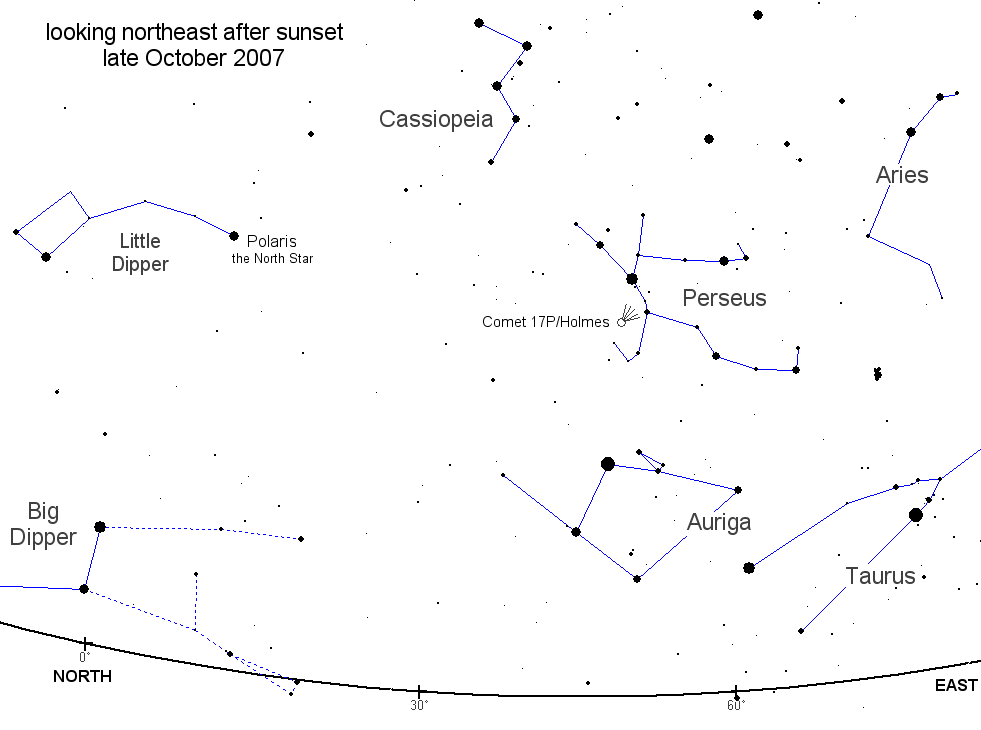
I found out today that you can see a naked eye comet in the constellation of Perseus. On October 24th comet Holmes erupted and brightened almost a million times, taking it from magnitude 17 to 2.5 (the smaller the number, the brighter the object). Comet Holmes is a periodic comet that was discovered in 1892 by Edwin Holmes during another such eruption. You can find where to see the comet with this map. I went out tonight and took a peek with binoculars. It looks like a fuzzy circle, not your typical comet shape, but very cool nonetheless. The reason we don’t see the tail is that it is in the line of sight with the Earth, so we’re looking down the length of the tail. If you have a pair of binoculars or a telescope, it would be worth pulling them out and taking a look. You should be able to see the comet at least through the middle of the month, at which time the moon returns and will light up the sky. Right now the comet is just beyond the orbit of Mars and appears to be about the size of a third of the full moon.
Thursday, October 18, 2007
Sony Announces a New PS3
Sony is going to give gamers a Merry Christmas this year. The PS3 lineup will have a few changes for the upcoming holiday shopping season. For starters, Sony has announced that it will be dropping the price of the current 80GB PS3 to $499 (down $100). They will also release a new PS3 to the US for $399 with 40GB of storage. The 40GB model has already debuted in Japan and Europe, and the introduction to the US market is probably to help boost sales here. The Wii has sold 9 million units since its release, while by comparison the PS3 has only sold 5 million. (By the way, if you haven’t played the Wii, get your tushy down the nearest game store that has one and try it out.) The new PS3 will not be able to play PS2 games as the current models do so that Sony can concentrate on providing new games for their new platform. The new model will still be the most expensive of the three major consoles, but the new price tag should look a bit more appealing than the current models for those gamers on a budget.
Tuesday, October 9, 2007
New Zunes on the Horizon
Microsoft has announced that they will be releasing new Zunes in November. The 80 GB hard drive Zune will be available in black with a 3.2 inch screen and sell for $250. This model is the most similar to the current Zune being sold. The new slimmer Zunes will be available in a 4GB and 8GB that uses flash memory. Flash memory has no moving parts, which is a big plus for people who are hard on their devices. The 4GB and 8GB models will come in pink, green, black, and glossy red. It looks like the smaller Zunes will sell for $149.
Both new models will come with the ability to sync wirelessly and will extend the wireless sharing function. The Zune will get new touch controls as well, which I imagine will be like the current iPod controls. Also getting a facelift is the Zune Marketplace. Microsoft hasn’t said much more than this on their Zune website, but as the month goes on I am sure they will have more teaser information posted.
What’s that you say? You already have a Zune? No problem…Microsoft intends to push out Marketplace and firmware updates so that current Zune owners can get the new features on their players.
Monday, October 8, 2007
Canon Unveils the PowerShot SX100 IS

As far as options go, there are the standard settings that most point-and-shoots have preconfigured, like portrait, landscape, foliage, night time, etc. The SX100 give you Program, Tv, Av, and M settings so that you can set all of your options like ISO, f/stop, and shutter speed manually. This is the part that my husband was excited about. I’ve found since using the manual settings that I want to learn more about what they are and how they work. You can even do white balancing with preconfigured settings, or you can manually white balance so that you get exactly what you want. The macro setting is awesome. I am finding that I enjoy this feature the best so far. The closest the manual says you can get to an object and still focus is about a half an inch. I’ve tried this out and it holds true. The picture I’ve attached at the bottom of this post is a tomato about an inch in diameter in the morning dew, taken at about an inch away. The camera does come with video capability at 640x480 and 30 fps with sound. I tried this out and was able to view the video maximized on a 17” widescreen LCD monitor without any pixelization. The sound on the video is pretty good, but you do have to be careful not to bump the camera too much or you will get those noises on the video.
Now, you may think that setting all of these features is going to be difficult. Wrong! This is one of the easiest interfaces to get around in. There aren’t a ton of buttons to begin with, and they have pictures next to them to tell you what it does (like the flower symbol for the Macro setting). It does have a wheel on the back that you can either press in the four directions, or turn around in a circle to get around your menus. The four directions are considered buttons since they each do something different when you push them. The left side of the wheel allows you to set the Macro settings, the top button the ISO settings, the right button the flash settings, and the bottom what kind of shot you want to do (continuous, single, timed, etc.).
The best part…all of this comes at the reasonable price of $300. When we compared this camera to the others we saw in the store, we felt like we got the most options for the price. Canon is really making it a point to offer point-and-shoots that appeal to both the beginner and the pro who want a camera that has SLR features, but without the bulk of an SLR.

Tuesday, October 2, 2007
I Finished the Fight
Finally, when I returned home Friday, I was able to play Halo 3 with my husband. We like to play these kinds of games on cooperative so that we can play the whole storyline through together. It’s handy when someone (me!) decides to run with guns blazing into battle just to be killed over and over again by hordes of enemies. He stays in a safe place, popping off a few big guys with a sniper rifle, so that I can respawn and do the whole thing over again. Hey what can I say, that’s my style. :)
The one word to describe the game is beautiful. The graphics are a big improvement over Halo 2. There was a difference in graphics and AI between Halo and Halo 2, but there’s a much bigger difference in both between Halo 2 and Halo 3. Everything in the game is much more detailed and reflects light much more realistically. When you’re in the sunlight and turn towards the sun, your gun will glint as you around catching the light. It’s hard to describe without actually seeing it. When you catch a reflection it will actually kind of blind you a bit just like it would in real life. I caught myself wanting to squint at times. It did seem as though everything was shiner as if the designers were saying, “Hey look at this neat thing we can do!” The effect was gorgeous though. You find yourself simply taking time to admire the scenery and effects between battles. Even the plant life is more detailed than the previous versions. If you run through a fern or bush, and the leaves have very detailed textures. The character’s faces show much more detail and emotion than before. And they’re smarter. And they drive better which is a big improvement over Halo 2. I always liked it when your guys would drive in Halo 2, but they didn’t drive the best and I’ve had my fair share of being run over by them. Just get out of their way and let them go, because they would always take off and kill most of the enemies before you could catch up. Halo 3 fixes that and they wait on you now (yay!) and don’t drive as crazy as they did before.
I’ve noticed that the movements of the characters are much more lifelike in this game as well. There was a scene where the Master Chief was leaning over a table with his hands on the table. I remember noting that his arms and shoulders bent very fluidly and even had that little give in the shoulder when he bent farther over. Again, it’s hard to describe unless you see the game, but it’s one of those moments where you say, “oh how cool.”
If you play the game on cooperative mode, Player 1 will be the Master Chief and Player 2 will be The Arbiter. This change is key to the storyline of the game and really helps you get into the plot. A few weapons have changed and you get a few extra, such as the Gravity Hammer. It’s pretty much a big stick that will destroy any enemy in 10 feet of you. If you run across one, pick it up. It’s great fun to use. You will also see some new vehicles this time around. The Chopper has the same principle as the Ghost, but meaner. The Hornet is a new flying vehicle that you can take to the skies with. The Wraith is harder to steal but still packs the same punch it did before. You do get the Scorpion with a few improvements. It’s faster than what it was in the previous games, and you can have a second player shoot a machine gun along with the first player still firing the main gun.
WARNING: SPOILERS IN THIS PARAGRAPH: I did get a lot of satisfaction in one part of the game when I finally was able to kill 343 Guilty Spark (aka The Monitor and The Oracle). I know he’s just a little metal floaty ball with a blue light that hums all the time, but darn it felt good to blow him up. You even get a big gun to do it with which made it even more fun. Yes, some people that you’ve grown to love do die in the game. I won’t say who, but not everyone gets to finish the fight.
Ok, the spoilers are over now. If you play Halo 3 don’t forget to do something very important. When the credits roll after the last level is over, don’t end the game. Let the credits finish and there is an extra movie at the end. I’m not going to spoil anything, but it will leave you with a better feeling about the ending of the game if you watch the final after-the-credits movie. The storyline does finish out and wrap everything up. However, the designers do leave open a few possibilities, maybe for future games or the plot of the Halo movie that is supposed to come out sometime in 2008 or 2009. That is just my speculation for what it’s worth.
All in all it was great game that any Halo fan will enjoy. It is a bit short but the graphics, AI, and storyline make up for it. If you haven’t played any of the Halo trilogy, start with the first and work your way up. I wouldn’t recommend starting with the last one and then going back to the first.
Thursday, September 27, 2007
Voyager Turns 30
This fall is the 30th anniversary of the Voyager missions to the outer planets and beyond. The missions brought back the first close-up images of Jupiter, Saturn, Uranus, and Neptune along with a plethora of new discoveries about the planets and their moons. Before these missions no one knew that there were volcanoes on any other celestial body other than Earth. Jupiter’s moon Io turned out to be THE place in the solar system for the ultimate in volcanism. From fire to ice, Neptune’s moon Triton, the coldest body in the solar system, was discovered to have geysers that spewed nitrogen gas and dust high into it’s atmosphere. I grew up in the Voyager age and can remember learning about the planets from the very pictures that the spacecraft sent back to Earth. We’ve learned so much since Voyager 1 and 2 passed through our outer Solar System, and we have such a better understanding of these planets and their moons because of these two missions. When Voyager 1 passed the orbits of Neptune and Pluto, NASA turned around the craft and took a picture of our tiny Earth, which looked like nothing more than a small blue speck against a black backdrop. NASA also took pictures of the rest of the planets and made a family portrait of our solar system family. Those spacecraft are still transmitting data, 30 years and about 9 billion miles later. Scientists think the craft are approaching the boundary of the heliopause, where the solar wind and interstellar wind meet. In about 80,000 years they will reach Alpha Centauri, our closest star at around 4 light years away. In billions of years when the Sun is nothing more than a cinder, these two spacecraft will still be on their journey through our galaxy, carrying with them a piece of humankind and human spirit.
Tuesday, September 25, 2007
Germs From Space
Does this sound familiar? Germs from space, more powerful than what we have here on Earth, come to earth and attack all of mankind. Sounds like your typical bad (or good, depending on your point of view) 1950’s sci-fi movie. I’ve seen my share of those in my time. The space shuttle mission STS-115 that launched back in September 2006 came back with their own mini bad B-movie. An experiment onboard provided evidence that germs really do get stronger outside of the Earth’s atmosphere. A package of Salmonella was taken onboard, carefully protected, to monitor the change in the germs in zero gravity. Turns out the little guys do alter their DNA to adapt to the change in environment so they can survive. The germs were fed to mice back home and the mice were more likely to get sick and died faster than the control set who were fed the germs that had stayed on the ground. This is a handy thing to know for the future of space travel since anywhere humans go, germs go. If humans are to spend a long time in zero gravity we must learn how our invisible little counterparts will react as well. It also will come in handy here on Earth to better understand how germs change, and how to treat the resulting infections. It’s interesting to note that despite all the accomplishments that humans have done and the distances we have traveled, it’s the littlest life forms that still have the biggest impact on us.
Monday, September 24, 2007
Finish the Fight
The release of Halo 3 is just hours away. Oh, how I’ve waited to know how this saga ends. The kicker is that I am out of town for training this week. Yes, you heard correctly…out of town, without an XBOX, and without Halo. It’s a sad, sad day. I haven’t quite figured out why I didn’t check the calendar first to see what was going on this week. If I had, I would have scheduled the class for another time. I predict that lines will be no less that those of who waited for the last Harry Potter book or the iPhone. If you have an XBOX 360 and haven’t played any of the Halo trilogy (shame on you!), you should go out and give them a try.
Why is Halo so great you may ask? The sheer beauty of the game is one very appealing aspect. Combine that with a kick-booty storyline and two modes of multiplayer (online and cooperative), and you’ve got yourself an award winning game. It’s one of those games that I can play over and over, and not get bored with it. I can even find something new in the game despite the fact that I’ve played it dozens of times. Tomorrow will be a grand day for gamers. I’ll be watching from my hotel room. :)
Tuesday, September 18, 2007
:-) Has a Birthday
It’s been 25 years since the emoticon smiley :-) was born. It was invented by a Carnegie professor by the name of Scott E. Fahlman back in 1982. It allowed people to do something that was very difficult…express emotion in an email or other form of communication. That’s pretty important since emails can be so hard to read as far as emotions go. I wonder of Vulcans would use any kind of emoticons in their communications? :)
Touch the iPod Touch
I was able to play with the new iPod Touch this weekend at Best Buy. Yep, it’s cool – very cool. The part that would stop me from getting it right now is the price tag. However, after getting a chance to use it for a while I think the best new feature they could have added is the Wi-Fi capability. The Internet is more fun when you get to pinch your way into zooming in and out of a webpage. The screen itself is just plain beautiful. I found that the keyboard that pops up when you want to type in a webpage is fairly easy to type on. I do have smaller hands than a guy would admittedly, and my husband didn’t get a chance to look at that feature when he was there. I have heard reports from other reviewers who have big hands or chubby fingers that typing can be a problem if you don’t pay close attention to where you are tapping, but I can’t say that from personal experience.
Pretty much the Touch is an iPhone without the phone capability. I think this is a nifty thing for those of us out there who just want the cool interface and not the data plan and all the “etc., etc.” that goes along with getting the iPhone. If you get a chance to stop by a retailer who has an iPod Touch on display, you have a pinch at it. It’s definitely one of the most fun gadgets I’ve had a chance to look at in a long time. Yep, I am hoping that Apple will do a $200 price cut on it in two months. :)
Monday, September 10, 2007
iHop For My iFrogz
Whether you own a Zune or iPod (or are looking at buying one), one place that has really cool cases for them is a company called iFrogz. I own two of the custom silicone cases for my 30GB iPod Video and I love them. They’re thick and don’t attract lint (which is important for a neat freak like me). The cases I have come with a wrap that covers the whole iPod except for the screen an click wheel, a screen protector, a band that goes around the outside of the device to protect your ports, and a sticker to cover the click wheel. All are customizable. Mainly I bought mine for protection (and it does a wonderful job of that!), but the pretty colors and cool picture for the click wheel sticker are a definite perk. The Zune doesn’t have all of the same options since you really can’t cover the controls with a sticker easily and still have it usable, but you still get the screen protector, band, and wrap. They even have cases for the Shuffle, Nano, and iPhone. They currently have a special going on where you can get 50% off if you order before September 16th, so if you’re interested stop by their site before then.
The Zune Gets a New Price Tag
Looks like Microsoft is getting the price slashing bug as well. The Zune, Microsoft’s MP3 player that is a competitor to the iPod, was cut by $50 last Wednesday bringing it to $199. Seems like it didn’t get as much press as the iPhone price cut, but then again it didn’t quite tick as many people off either. I’d actually probably consider a Zune for my next MP3 player. Not that I don’t like my iPod, but if I had to buy another one I’d have a hard time deciding between an iPod Classic and the Zune. And the price cut helps too. :) The main reason I purchased a iPod this last time around is that I thought the screen looked a little crisper and brighter. I was also used to the iPods since I owned a Mini prior to my 30GB iPod Video. However, a $50 difference would be a factor if I had to make that decision now.
Wednesday, September 5, 2007
The Beat Goes On, and On, and On...
Well, get ready for some reading. This post is going to be a long one. Apple had their big announcement today and yep, there’s going to be a new iPod and a few changes to some old favorites. Oh, where to begin?
The iPod Shuffle: 1GB, $79
The shuffle will get a wardrobe change and come in red, silver, blue, green, and purple. The blue, green, and purple aren’t as vibrant as the previous colors but they are pretty.
The iPod Nano: 4GB and 8GB, $149 and $199
The Nano gets an even bigger wardrobe change with the introduction of video and the new Cover Flow interface. It’s cute…shorter and fatter than before with a 2”screen (320x240) that is the same resolution as the current 5th Gen iPod Video. The whole thing is only 2.75 inches tall. The Nano also comes in new colors…silver, black, red, green, and blue. The 4GB variety is only available in silver. It’s also really thin – only 6.5 mm. The battery life isn’t bad either…5 hours for video and 24 hours for audio.
The iPod Classic: 80GB and 160GB, $249 and $349
This little baby is similar to the 5th Gen iPod Video but with the new Cover Flow interface and bigger hard drives. The colors have changed a bit in that the case is now metal and are available in grey and black (pretty close to the white and black offered in the iPod Video). Both versions come with a 2.5” screen and are a total of 4.1 inches tall. The 80GB is .41 inches thick (10.5 mm) and the 160GB is .53 inches (13.5 mm) thick. Playback time is lengthy with the 80GB having 40/5 hours for audio/video and the 160GB having 40/7 hours. These actually are pretty good prices considering you’re getting double the storage space as the 5th Gen Videos for the same price.
The iPod Touch: 8GB and 16GB, $299 and $399
The Touch is the most innovative iPod of the group. It looks a lot like the iPhone, only without the phone features. You get around the interface the same way you would an iPhone. Full sized touch screen (3.5 inch diagonal) and overall 4.3 inches tall. It’s thin too…only .31 inches (8 mm). Also new to this iPod is the Wi-Fi capability. Now you can download your favorite songs directly to your iPod wirelessly using iTunes that is installed on the device itself. Once you sync your iPod Touch with your computer, it will copy the music you purchased back to the iTunes library on your computer. Considering the screen type on the Touch, the playback times aren’t bad at all with 22 hours of audio and 5 hours of video. It even has Safari on it making it the first iPod to have Internet capability. Yep, I said Internet. In my opinion it’s a little pricey still but considering you’re getting the new interface, it’s not too bad.
Wi-Fi Music Store
As mentioned in the iPod Touch section, you can now download your favorite music through iTunes using the built-in Wi-Fi in the Touch and iPhone. Once you connect your device to your computer, iTunes will sync with it and copy the music you downloaded into your iTunes library.
Starbucks
Apple and Starbucks have come up with a plan to make it easier to download music at a Starbucks store. You can see what is currently playing at your favorite java hangout and also see what last ten songs were in their playlist. You can also download them while you’re there. Most all Starbucks should have this functionality by the end of 2008.
Ringtones for the iPhone
One thing people were complaining about is not being able to put custom ringtones on their iPhones. Now Apple has provided the opportunity to download ringtones to your iPhone through the iTunes store for an extra 99 cents a song. Say you find a song you like on iTunes and want to download it. So purchase it and then decide hey, that would make a great ringtone. Any song with the ringtone icon next to it in iTunes will give you the option to choose 30 seconds of the song, and for an extra 99 cents you can have those 30 seconds as a ringtone as well. Apple’s reasoning is that the $1.98 for the ringtone is cheaper than most ringtones you can purchase online.
Finale
So there you have it -- all the new products and technology that Apple is releasing involving the iPod. If your eyes aren’t worn out yet, head on over to Apple’s website to check out pictures and demos of their new toys.
Tuesday, September 4, 2007
Three More Weeks Until the Halo 3 Release
Yep, I’m counting down now. Three more weeks until Halo3 is unleashed on the world and we can all find out how it ends. The ironic part – I will be in San Antonio for a week attending class for work and won’t be able to play it. Sigh. I suppose good things come to those who wait.
So You’ve Hacked the iPhone…
I wondered how long it would take for the big “L” word (Legal, that is) would take to pop up in reaction to people unlocking the iPhone for use with carriers other than AT&T. I gotta give that 17 year old kid credit for doing it though. If Apple or AT&T were smart, they’d snatch him up. Apparently it’s not illegal to unlock the phone for personal use, but it might not be legal to unlock it and sell the phone or the technology to unlock it for a profit. I’m betting they’re not going to do the kid anything, but I do foresee any companies wanting to sell their software hacks being shut down. I’ve heard talk of other cell phone makers producing spin-offs of the iPhone. If it were me, I’d just wait until one of them came out with one before I go hacking into any $600 phone and voiding a warranty. :) You can read more at FoxNews.
Sunday, September 2, 2007
iCar
Apple and VW are in talks about possibly doing an iCar. Yep, one more product to keep track of that has the “i” on the front of the name. Apparently this car will go further than just the iPod hookups that are currently integrated in many VW autos. No details have been released yet on exactly what would be included in this car but one can imagine it would be a nifty little piece of engineering.
Friday, August 31, 2007
New Subscription Options
I’ve added a couple of features for my readers to make it easier to read my blogs. Below the poll you’ll see two links. One is to subscribe using your favorite RSS reader, and the other is to subscribe so that you can get new posts via email. Both links are through feedburner.com.
You can also subscribe to my posts through Atom if you scroll down to the very bottom of the blog page. You’ll see a subscribe link there.
The Beat Goes On
So I hear rumor that there will be a big Apple announcement September 5th. I like to keep up to date on things by listening to podcasts with Leo Laporte (who used to be on The Screen Savers and Call For Help on TechTV, which is now G4TV). He mentioned on one of his podcasts this week that he received an invitation to this announcement event and it was titled “The Beat Goes On.” Another iPod on the way perhaps? I will be watching the news closely on the 5th to see what the big announcement will be. I have an iPod Video now and I have to say I am pretty pleased with it. The hard part will be resisting selling it to get the new one, if that is in fact what will be announced.
Saturday, August 25, 2007
Blast to the Past
My first computer was an Apple IIGS that we got back around 1988. I was about 8 years old or so. The GS stood for Graphics and Sound. It had a color monitor and everything. And I’m talking a real monitor, not a TV that you hooked up to it. I remember a lot of people would connect their TV’s to their computers back then. Nowadays you have to buy a special card for that. My IIGS came with two disc drives…a 5.25 inch floppy and a 3.5 inch floppy. Those were the days. The cool games were on the 3.5 inch discs. Dark Castle was probably my favorite. I never did beat the last level on it, but I still loved playing it. I also remember Wheel of Fortune and that cheesy music it had with it, and The Oregon Trail. Those were on the 5.25 inch floppies so of course the graphics were inferior to Dark Castle. :)
For the longest time I had wanted to play Dark Castle, but short of plugging in the old IIGS I never had much luck on finding it back on the great expanse called the Internet. I had found a few emulators that you could download and load the disc images but the ones I had played with were a hassle. A couple of years ago I found a really nifty little website called virtualapple.org that has a ton of Apple II and Apple IIGS disc images that you can play on their website. It’s free, and there is a location to make a donation if you would like to. Every game I could think of was on there, plus a few I had forgotten about. Zany Golf, The Bards Tale, Mean 18, Choplifter…you name it. They even have the “Your Tour of the Apple IIGS” disc that would help you learn to use the mouse and keyboard…beginners stuff but fun and mindless. I LOVE this website. Despite the kick-tushy graphics they have nowadays, it’s still fun to go back to the old days and play those games I grew up on.
Thursday, August 23, 2007
The NES Mouse

Google Sky
If you haven't tried Google Earth yet, you should. It's a free download from Google that you can get here. You can zoom around the globe, search addresses, and add layers like Road Names, Parks and Recreation, Dining and Lodging. Very nifty. Even if you don't want to find a specific address, it's still fun to pan around the world and zoom in on terrain.
With the newest version 4.2 they have included Google Sky that does the same thing as Earth, but in the heavens. Since I'm the astronomy buff of the family I naturally had to give this a spin (no pun intended). To get to Google Sky, open Google Earth and click on the View menu. Choose "Switch to Sky." The layers for Sky include Constellations, Hubble Showcase, and Backyard Astronomer. You can do searches on the sky for constellation names, stars, nebula, and galaxies…really just about any sky object. You can also search using the Messier and NGC catalogs numbers. If you zoom in far enough to an object you will see a picture of it, and a pretty good one at that.
Granted I wouldn't use this for my primary sky charting software. I like Stellarium. much better and it's a freebie as well. However, this is a neat feature to add to Google Earth. Google has also put together Google Moon and Google Mars. You will have to browse to the website for these tools. It's a fun thing to play with if you want to take a trip to space without leaving the comforts of Earth.
Tuesday, August 14, 2007
We Love the Wii
If you haven’t bought a Wii yet, get one. Get one now. It is honestly the coolest thing I’ve ever played. And you get quite a workout, which is great for those of us who are waistline conscious. It comes with sports games that really are of a great quality. I am not a sports fan and even I like to play them. Tennis is probably my favorite, and boxing is the most strenuous (at least for me). They have a few classics too, including Mortal Kombat and of course Mario. I never had a Nintendo growing up but I still love Mario. Their new titles are fun too and put a whole new twist on trying to drive a race course. Rayman Raving Rabbids will just make you laugh. The bunny thingies are hilarious when they run around screaming. Perfect after a long day at the office. I’d like to try Harry Potter on it just because the wand would be a terrific item to use with the Wii controls. The controls are easy enough to use and you get adjust to them very quickly. Don’t get me wrong I love my XBOX 360 and I love my Halo. But, if you’re looking for something a little more relaxed than your first person shooter, then the Wii is definitely for you.
Saturday, August 11, 2007
Space Hotel
Just read that there is a company that wants to build a space hotel by the year 2012. If I had a spare $4 million, I’d go. Click here for the NY Times story.
Technology = Fun
Technology is fun. At least they can be if you let it. I know a few people who see computers as work machines. Probably never even open Solitaire. Poor souls. Vista comes with some nifty games built in now. Mahjongg and Chess are my favorites. I didn’t know how to play chess until I started fiddling around with the one that came with Vista. So see, you can learn something and still have fun at the same time. :) Sounded like a good excuse anyway. If you decide to try Chess on Vista, change the difficulty to level 1 first. I’m pretty proud I’ve managed to beat it a few times on that level. I don’t think I’ll branch out to a higher difficulty just yet. Might take the fun out of it.
I’ve that some people tend not to appreciate the coolness factor of things. I’ll admit it, I’m shallow. If I am going to spend at least 8 hours a day looking at a computer, it better look nice. I LOVE the new Vista interface. Beautiful. And to top it off, just plain cool. Take the new iPod’s. I mean do you really need a color screen and cool colors to listen to music? Probably not. But it’s COOL. Hot pink Razr? Sure, why not! It’s COOL. Enjoy your technology and have fun with your computer. That’s what it’s there for.
Friday, August 10, 2007
Stellarium
My parents always tell me that my fascination with the universe started the moment I could say the word "moon." I found a freebie sky program out there for download for all you astronomy buffs called Stellarium. You can download it at http://www.stellarium.org/ . It’s pretty sophisticated for a free program. It will track the sky over time so if you leave your computer and come back 30 minutes later, the sky will have changed. It will even track the tilt of Saturn's rings over a few months. A handy feature is a mode that will change everything that displays white (like names, constellation boundaries, etc.) to red if you are using the program outside at night. I’ve done that and it beats a paper star chart. It will show the phases of the moon as well. You can customize it to show or not show constellation lines, constellation boundaries, names, what magnitude to display stars and nebulas up to, and a plethora of other options. I mainly use it to see what’s up in the sky at any given time. It's definitely worth a look into for amateur and serious astronomers alike.